
To claim your business in ChatGPT, open Business Hub from the ChatGPT sidebar, find your listing, prove it is yours with a code or a DNS record, wait for OpenAI to approve the claim, and then pass an ID check with Persona. After that you can edit your profile, add a product feed, see Insights and, if you qualify, publish a Business Agent.
OpenAI opened Businesses in ChatGPT in beta on November 10, 2026. This guide follows OpenAI's own launch post and its Help Center article, checked on November 11, 2026. It tells you what to click, what to have ready and where people get stuck.
Key Takeaways
- You do not need an ads account or a ChatGPT Enterprise deal to claim. You need to own the business or be allowed to act for it, and have a website.
- There are four ways to verify: business phone, business email, website domain (a TXT record) or Shopify.
- You must pass an ID check with Persona before you can publish changes, add a product feed, see Insights or create an agent. That check uses your own ID.
- The Business Agent is for eligible online stores and online services in the United States for now.
- OpenAI says claiming does not guarantee higher placement or sales. It gives you control of the facts.
What Businesses in ChatGPT actually is
It is three things in one place. First, a way to claim your business and keep the details ChatGPT shows about it correct. Second, Insights: the number of mentions and website clicks over the last 28 days, plus the topics where ChatGPT cited your site. Third, a Business Agent, a chat assistant that answers customer questions from your own facts.
OpenAI says ChatGPT now has 1.2 billion weekly users. When someone asks about a product or a service, ChatGPT can show your business and link to your profile. If you have a published agent, the customer can start a separate, clearly labelled chat with it.
Before you start: your facts sheet
Open a blank note and fill this in first. It stops you from quitting halfway.
- Business name and website
- One clear sentence on who you serve and what you do
- Your category
- Delivery policy and return policy
- Logo and one good cover photo
- Which verification method you can finish today
Use plain words. "Water heater repair in Austin" works. "Thermal solutions" does not.
The 13 steps
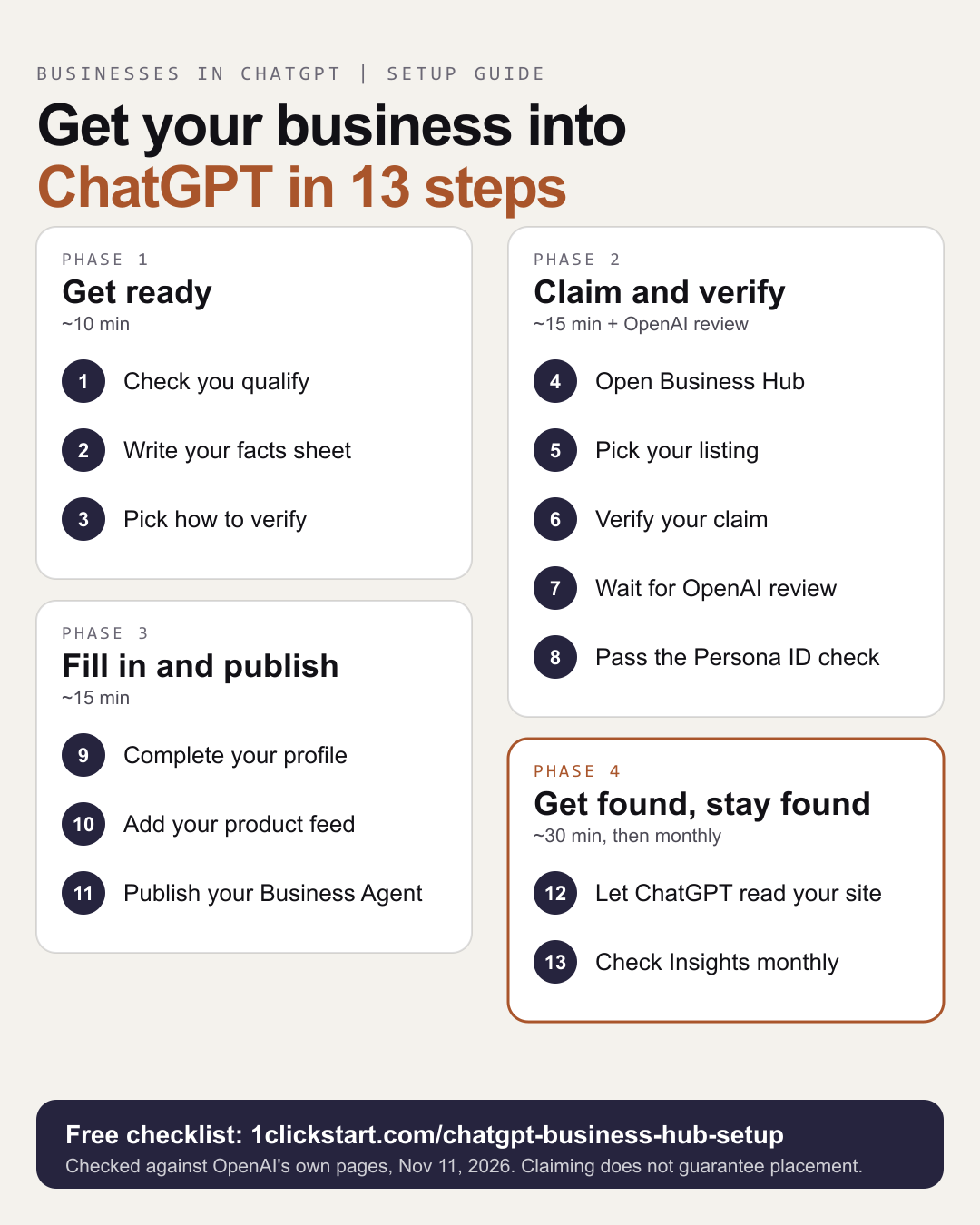
- Check you qualify. Own the business or be authorized to act for it. Have a website. Local stores and restaurants can claim an existing US listing. Agents are for online stores and online services in the US.
- Write your facts sheet. Use the list above.
- Pick a verification method. See the table below.
- Open Business Hub. Sign in to ChatGPT with the account that will run the business. Go to chatgpt.com/business-hub or use the sidebar.
- Pick your listing. Search by name. If it is not there and you run an eligible online business, you may see an option to add it. If it shows "Contact support", it is locked. If someone else claimed it, use the three-dot menu and "Dispute ownership".
- Verify your claim. Follow the prompts for your method.
- Wait for OpenAI's review. OpenAI emails you a decision or asks for more information. It gives no fixed time.
- Pass the Persona ID check. You may need a government ID, your business registration details and proof you can act for the business. Approval gives your profile a blue check.
- Complete your profile. Website, description, category, logo, delivery and return policies, cover photo. OpenAI reviews and publishes each change.
- Add a product feed. For stores. Shopify merchants can connect from Business Hub or the Shopify admin.
- Build, test and publish your Business Agent. Preview it with a real question such as "Can I return an item I bought on sale?" Fix the facts until the answer is right, then publish.
- Make your website easy to read. Allow OAI-SearchBot in robots.txt, write your facts in plain text, give each service its own page and keep your name, address and phone the same everywhere.
- Check Insights monthly. A blank number can mean there is not enough activity to report yet.
The four ways to verify
| Method | What you do | Best for |
|---|---|---|
| Business phone | Get a code by text or automated call | Shops and services with a listed number |
| Business email | Get a code at your business email | Small online businesses |
| Website domain | Add the TXT record ChatGPT shows you to your DNS, then press Verify domain | Anyone who controls the domain |
| Shopify store | Connect and sign in to the store | Shopify merchants |
If someone else manages your domain, send them the TXT record. Copy the type, host and value exactly, because DNS changes can take time to show.
What the Business Agent can and cannot do
It answers questions about your products and policies, in your words, and links to your website. It cannot complete a purchase, make a booking or check a customer's order. It does not use data from any ChatGPT app you may have. You review and publish it yourself, and customers can only chat with a published agent.
Step 12 matters more than it looks
OpenAI says ChatGPT may also use other sources when it answers questions about your business. So your website still does much of the work. OpenAI's crawler documentation says sites that block OAI-SearchBot are not shown in ChatGPT search answers, and that a change to robots.txt takes about a day to reach it. Check that your host, plugins and firewall are not blocking it by accident.
Want it done with you?
Steps 1 to 6 take about 30 minutes with us. The profile and agent take about 30 more after OpenAI approves you, and OpenAI's reviews are the waiting part. If you would rather not do it alone, book a 30 minute setup session. We share a screen and do the first steps with you. We cannot do the Persona ID check for you, because it uses your own ID, and nobody can promise ChatGPT will recommend you.
The page that sets out all 13 steps with a picture, a verification chooser and a FAQ is our ChatGPT Business Hub setup guide. If you want a wider plan for how AI fits your business, see our AI consulting page.